

How to make working across time zones easy
Working across time zones is now commonplace for businesses and organizations. If you have teams or customers that straddle multiple time zones you’ll know that arranging meetings can be a challenge. Errors and missed appointments can be damaging to personal, professional, and business relationships, and why a time zone meeting planner can be helpful.
It is preferable to schedule a meeting during everyone’s work hours but this becomes more difficult as the number of and differences in time zones increases. A time zone meeting planner solves this.
If you have colleagues in London and New York and want to arrange a one-hour meeting with a potential customer in San Francisco, at least one person needs to be available outside their regular working hours. You don’t want that one person to be the potential customer.
Tips to ensure meetings are at the correct time for people in different time zones
- Always confirm what time zone people attending the meeting are in. It is always an appropriate question to ask.
- If you are scheduling a meeting, always confirm both the time and the time zone with potential attendees
- Be mindful of people’s time zones, especially your customers, remote employees and remote teams. Avoid arranging meetings outside of people’s waking and working hours.
- If you need to arrange a meeting at a time that someone needs to work outside their normal working hours, always acknowledge this and try to share the out of hours working around.
- Be aware of daylight savings time (DST). Most countries change their clocks back or forward around March and October. Most people know when their clocks change but it may not change in other time zones. Errors in scheduling are very common at this time.
- Be aware of the hemisphere people are in. Daylight Savings Time changes in March and October change in opposite directions in different hemispheres. The adage “Spring forward, fall back” works in the Northern hemisphere but is the opposite in the southern hemisphere.
- Understand the difference between GMT, UTC, and the time in the UK. GMT (Greenwich Mean Time) is a time zone, whereas UTC is a time standard, but neither change for Daylight Savings Time. UTC never changes. GMT is used by many countries for their time zone and also use Daylight Savings Time so they change to different time zones in summer.
- Rotate meeting regular times so that everyone has an equal opportunity for the least and most convenient times to meet. Using our example of London, New York and San Francisco, lets how these work out as potential meeting times in October:

- Record meetings if everyone approves. Sometimes it won’t be possible to find a convenient time for everyone. If someone needs to join a US west coast meeting from Europe, there might not be overlap within the working day. By recording meetings those that cannot make it can watch the meeting afterwards.
- Setup an agenda to allow questions to be asked in advance. This provides everyone, especially those that cannot attend, to have the opportunity to ask questions. When you send out an invitation, include the agenda and ask people to send in questions and talking points ahead of the meeting.
- Allow the conversation to carry on after the meeting. Arrange for follow-up chat on Teams or Slack so that people who could not attend or are busy after the meeting (or need to go to bed) can remain in the loop.
The global workplace means work habits are ever evolving. The rise of digital nomads and hybrid work also mean not everyone is in the same office. Scheduling work meetings across time zones is now commonplace and an important skill for everyone to learn.
So who is Timewatch and how can we help?
Timewatch is a specialist in resource scheduling & planning tools including enhancements for Microsoft Outlook / Office 365 to enhance Outlook team calendar management and time zone management. Our solutions add customer and customer timezones to appointments, ensuring zero possibility of error in customer and internal meetings. Contact us to discuss how we can help you schedule, plan and manage employee calendars better, and increase visibility and provide analytics for employee and team Outlook calendars.
Want to Learn More?
We welcome your questions as whatever you are seeking to achieve with time zone related appointments, we probably already have the facilities available to solve them
If you have any questions or want to see the system in operation, contact us via chat, or book a free consultancy call with a product specialists.
Speak with a specialist
Learn how a time zone meeting planner helps scheduling meetings in multiple time zones
Other posts you may be interested in:
 | Online meeting planner for multiple time zonesPlanning an online chat, conference call or video call for international collaboration can be difficult, especially when you need to find a time in the day when everyone is in their business hours. This is where a time zone meeting planner saves the day. |
 | Handy date calculation toolOnline date and time calculation tools and time zone meeting planner |
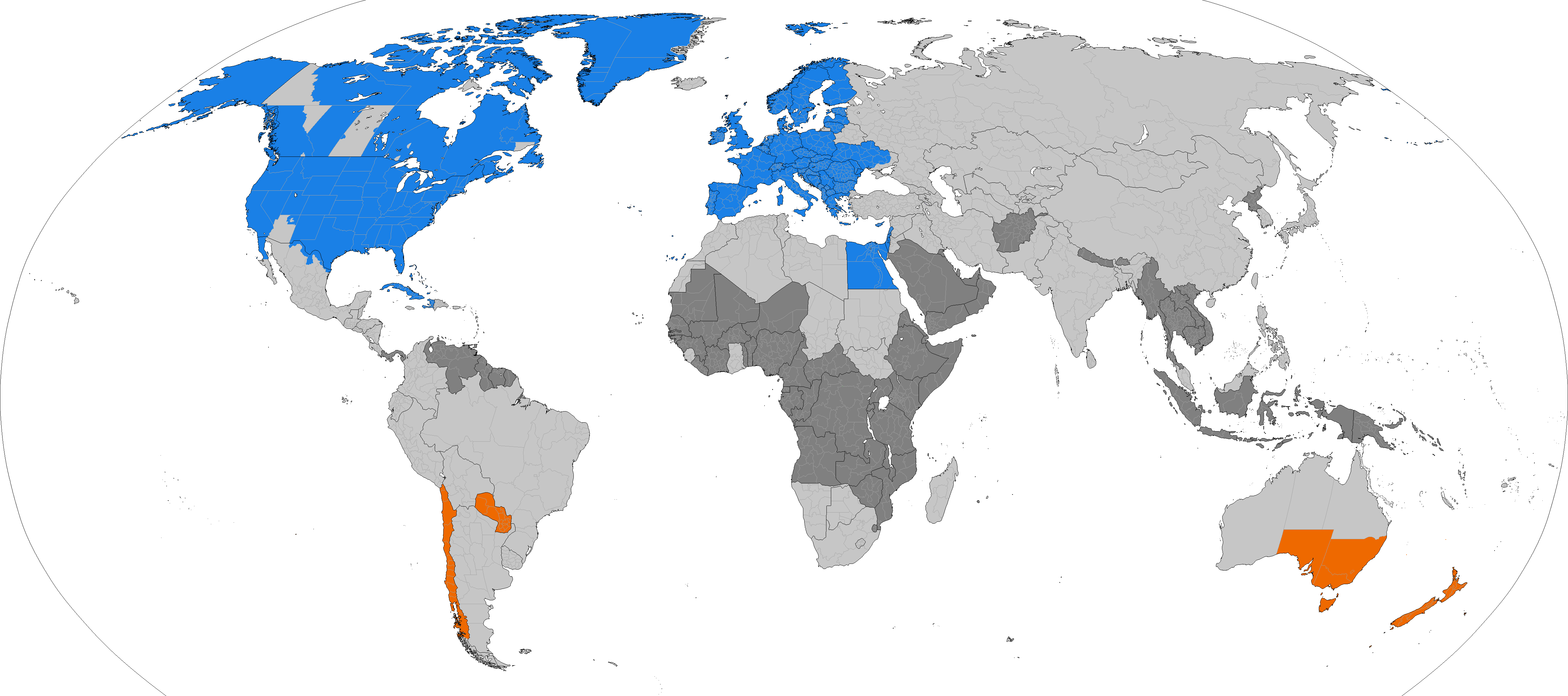 | A list of daylight savings by countryDaylight saving time (DST), also known as summer time, is the practice of advancing clocks during part of the year, typically by one hour around spring and summer, so that daylight ends at a later time of the day. As of 2023, DST is observed in most of Europe, most of North America and parts of Asia around the Northern Hemisphere summer, and in parts of South America and Oceania around the Southern Hemisphere summer. |
 | New – Outlook Optics™ – enhances Outlook with custom multi-calendar views, company calendar, team calendars, utilization and productivity views, reporting and moreOutlook Optics™ is a new Outlook add-on for businesses that use Outlook as their preferred personal management software but want a company calendar, organization-wide group calendaring, resource scheduling, or to analyze and report on Outlook calendar data. If your organization wants to improve the scheduling and management of employee calendars but you are not quite ready to scale up to a full-blown resource scheduling system, Outlook Optics™ is for you. |
 | How to create an Outlook Team CalendarWe are often asked how to create an Outlook Team Calendar to view an entire team’s calendars on one screen and how to analyze things such as team productivity, availability, capacity, etc. |
 | Use your own time from your calendar in your timesheet!Outlook (and Google) appointments are all in your local time and have the dates, start and end times of appointments as well as their subject. All of this information can be used in for time tracking, so why not use it and save employees time? With our Outlook time tracking add-on, employees’ calendar can be turned into timesheets. It saves employees hours each week and increases the accuracy of timesheet. |
 | Outlook has no analytics. You can’t query time by customer, project or employee. We solve that.Does Outlook have any analytics? No, none. You can’t see employee calendars side by side, time is only shown in local times, there is no time zone information or utc offset, and you can only see a couple of days, and even then there is not enough detail to be useful. Timewatch’s multi-employee add-on calendar for Outlook solves this. You can see as many people as you want over as many days as you want (within reason) and sort, search and filter by availability or capacity as well as access powerful analytical and reporting tools. It turns Outlook into a resource scheduling and company resource planning tool. |


